
A practical guide for robotics teams
Deploying and insuring your robot
The robot is only one part of the picture. Explore who is involved, what needs agreeing and which risks to discuss before it goes to work.
Whether you build robots, integrate them or put them to work, start with the actual task and environment. These four diagrams help you prepare a clearer conversation with your team, suppliers and insurance specialists.
01 · People & responsibilities
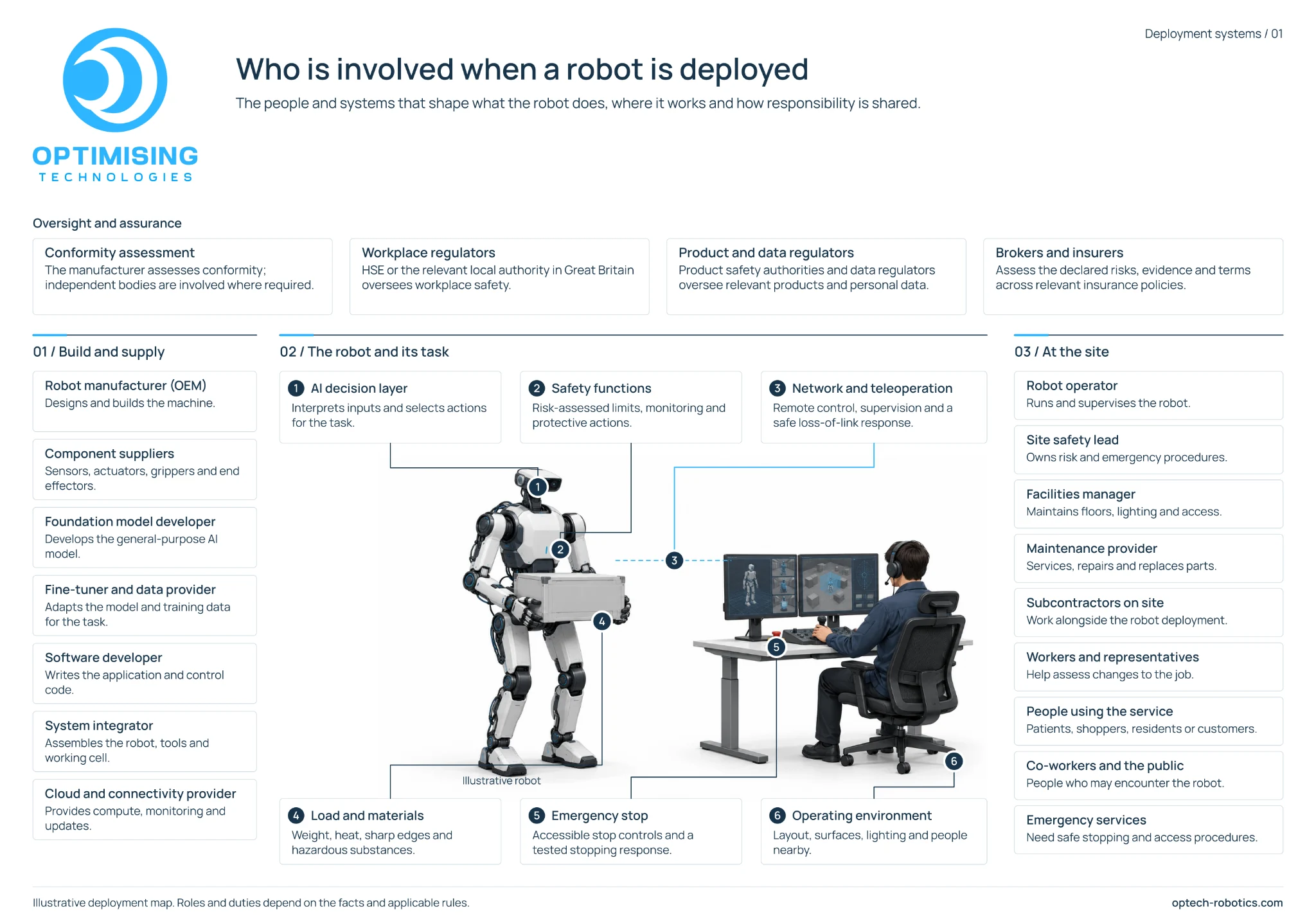
Who is involved when a robot is deployed?
A deployment brings together hardware, software, people and a working environment. Map those relationships before assuming that one organisation owns every decision.
 Open full-size diagram (opens in a new tab)
Start with three questions
- Who owns each part of the robot, its software and its operation?
- Who approves changes, maintains the system and can stop it safely?
- Which people could be affected, including those who never operate it?
Read the diagram in text
Build and supply
- Robot manufacturer
- Designs and builds the machine.
- Component suppliers
- Supply sensors, actuators, grippers and end effectors.
- Foundation model developer
- Develops the general-purpose AI model.
- Fine-tuner and data provider
- Adapts the model and training data for the task.
- Software developer
- Writes the application and control code.
- System integrator
- Assembles the robot, tools and working cell.
- Cloud and connectivity provider
- Provides compute, monitoring and updates.
The robot and its task
- AI decision layer: interprets inputs and selects actions for the task.
- Safety functions: risk-assessed limits, monitoring and protective actions.
- Network and teleoperation: remote control, supervision and a safe response to loss of the link.
- Load and materials: weight, heat, sharp edges and hazardous substances.
- Emergency stop: accessible stop controls and a tested stopping response.
- Operating environment: layout, surfaces, lighting and people nearby.
At the site
- Robot operator
- Runs and supervises the robot.
- Site safety lead
- Owns risk and emergency procedures.
- Facilities manager
- Maintains floors, lighting and access.
- Maintenance provider
- Services, repairs and replaces parts.
- Subcontractors on site
- Work alongside the robot deployment.
- Workers and representatives
- Help assess changes to the job.
- People using the service
- Patients, shoppers, residents or customers.
- Co-workers and the public
- People who may encounter the robot.
- Emergency services
- Need safe stopping and access procedures.
Oversight and assurance
The manufacturer assesses conformity; independent bodies are involved where required. Workplace, product and data regulators oversee the areas relevant to the deployment. Brokers and insurers assess the declared risks, evidence and policy terms. Roles and duties depend on the facts and applicable rules.
02 · Service contracts
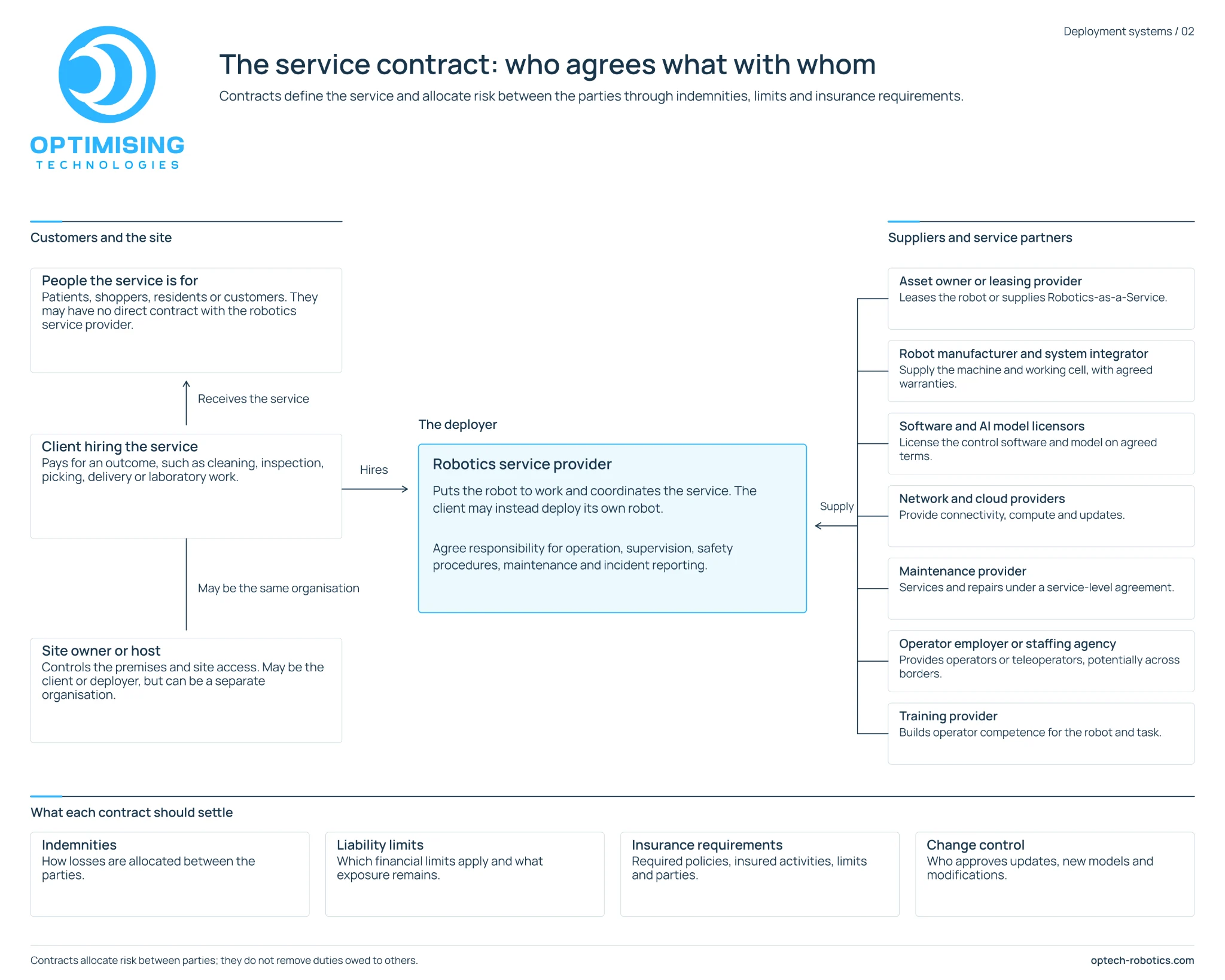
Who agrees what with whom?
The customer, site owner and robotics service provider may be different organisations. Make the service boundaries and responsibilities visible before deployment.
 Open full-size diagram (opens in a new tab)
Put the working arrangements in writing
- Who operates, supervises and maintains the robot?
- What happens when the service stops or an incident occurs?
- What limits, insurance requirements and change approvals need specialist review?
Read the diagram in text
Customers and the site
People the service is for: patients, shoppers, residents or customers may have no direct contract with the robotics service provider.
The client hiring the service: pays for an outcome such as cleaning, inspection, picking, delivery or laboratory work.
The site owner or host: controls the premises and site access. It may be the client or deployer, or a separate organisation.
The deployer
The robotics service provider puts the robot to work and coordinates the service. The client may instead deploy its own robot. Agree responsibility for operation, supervision, safety procedures, maintenance and incident reporting.
Suppliers and service partners
- Asset owner or leasing provider: leases the robot or supplies Robotics-as-a-Service.
- Manufacturer and system integrator: supply the machine and working cell, with agreed warranties.
- Software and AI model licensors: license the control software and model on agreed terms.
- Network and cloud providers: provide connectivity, compute and updates.
- Maintenance provider: services and repairs under a service-level agreement.
- Operator employer or staffing agency: provides operators or teleoperators, potentially across borders.
- Training provider: builds competence for the robot and task.
What each contract should settle
- Indemnities
- How losses are allocated between the parties.
- Liability limits
- Which financial limits apply and what exposure remains.
- Insurance requirements
- Required policies, insured activities, limits and parties.
- Change control
- Who approves updates, new models and modifications.
Contracts allocate risk between parties. They do not remove duties owed to others.
03 · Public-space risks
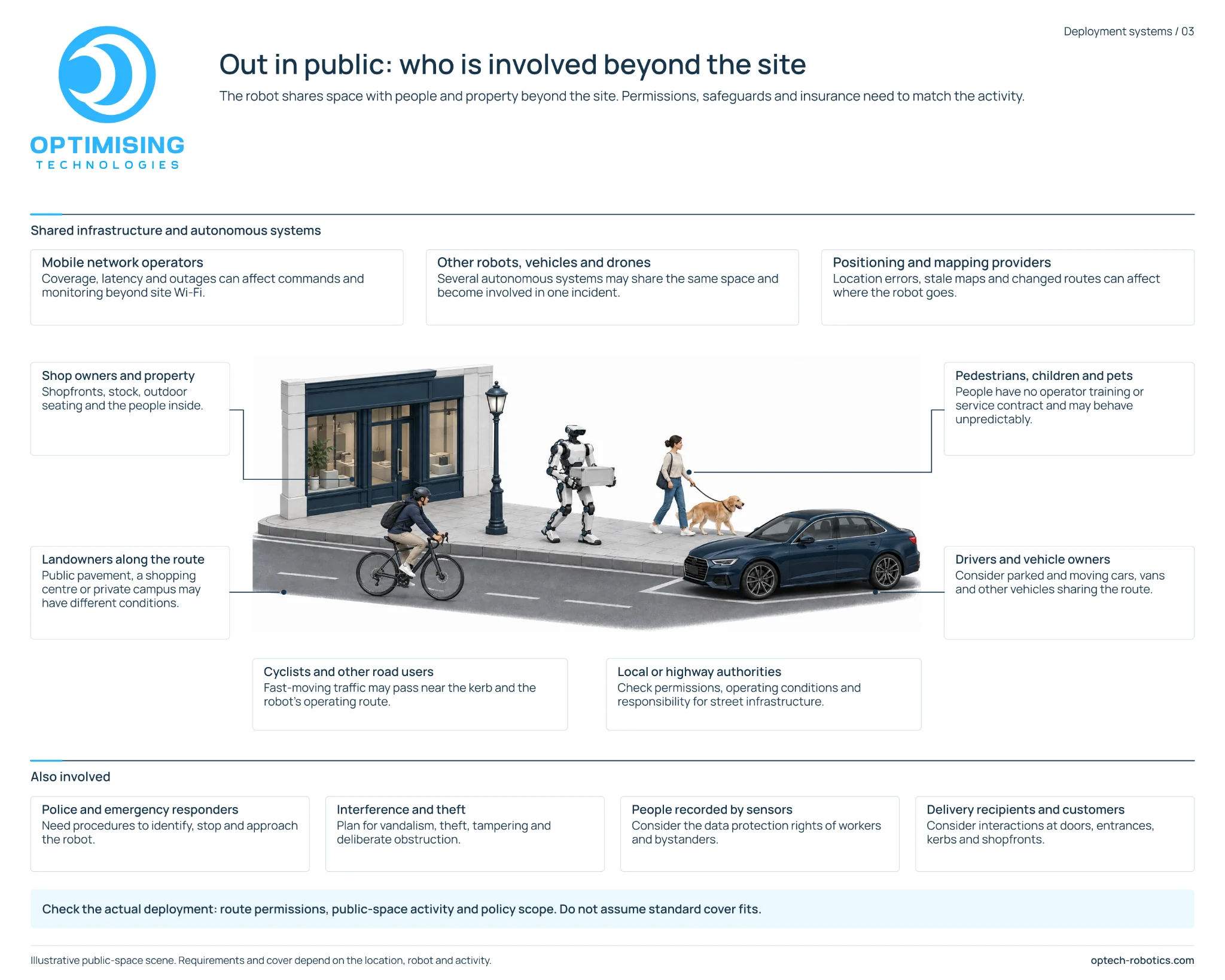
What changes when the robot goes out in public?
Beyond a controlled site, a robot shares space with people, property and other moving systems. The route, operating conditions and supporting services deserve their own review.
 Open full-size diagram (opens in a new tab)
Review the actual route
- Where will the robot go, and whose land or infrastructure will it use?
- How will it respond to people, obstacles and loss of connectivity?
- What should responders know, and what personal information could its sensors record?
Read the diagram in text
Shared infrastructure
- Mobile network operators: coverage, latency and outages can affect commands and monitoring beyond site Wi-Fi.
- Other robots, vehicles and drones: several autonomous systems may share a space and become involved in one incident.
- Positioning and mapping providers: location errors, stale maps and changed routes can affect where the robot goes.
People and property along the route
- Shop owners and property: shopfronts, stock, outdoor seating and the people inside.
- Landowners: public pavement, a shopping centre and a private campus may have different conditions.
- Pedestrians, children and pets: may have no operator training or service contract and may behave unpredictably.
- Drivers and vehicle owners: parked and moving cars, vans and other vehicles.
- Cyclists and other road users: fast-moving traffic near the kerb and operating route.
- Local or highway authorities: check permissions, operating conditions and responsibility for infrastructure.
Other questions to include
- Police and emergency responders: procedures to identify, stop and approach the robot.
- Interference and theft: vandalism, theft, tampering and deliberate obstruction.
- People recorded by sensors: the data protection rights of workers and bystanders.
- Delivery recipients and customers: interactions at doors, entrances, kerbs and shopfronts.
Check route permissions, public-space activity and policy scope for the actual deployment. Requirements and cover depend on the location, robot and activity.
04 · Failure & insurance
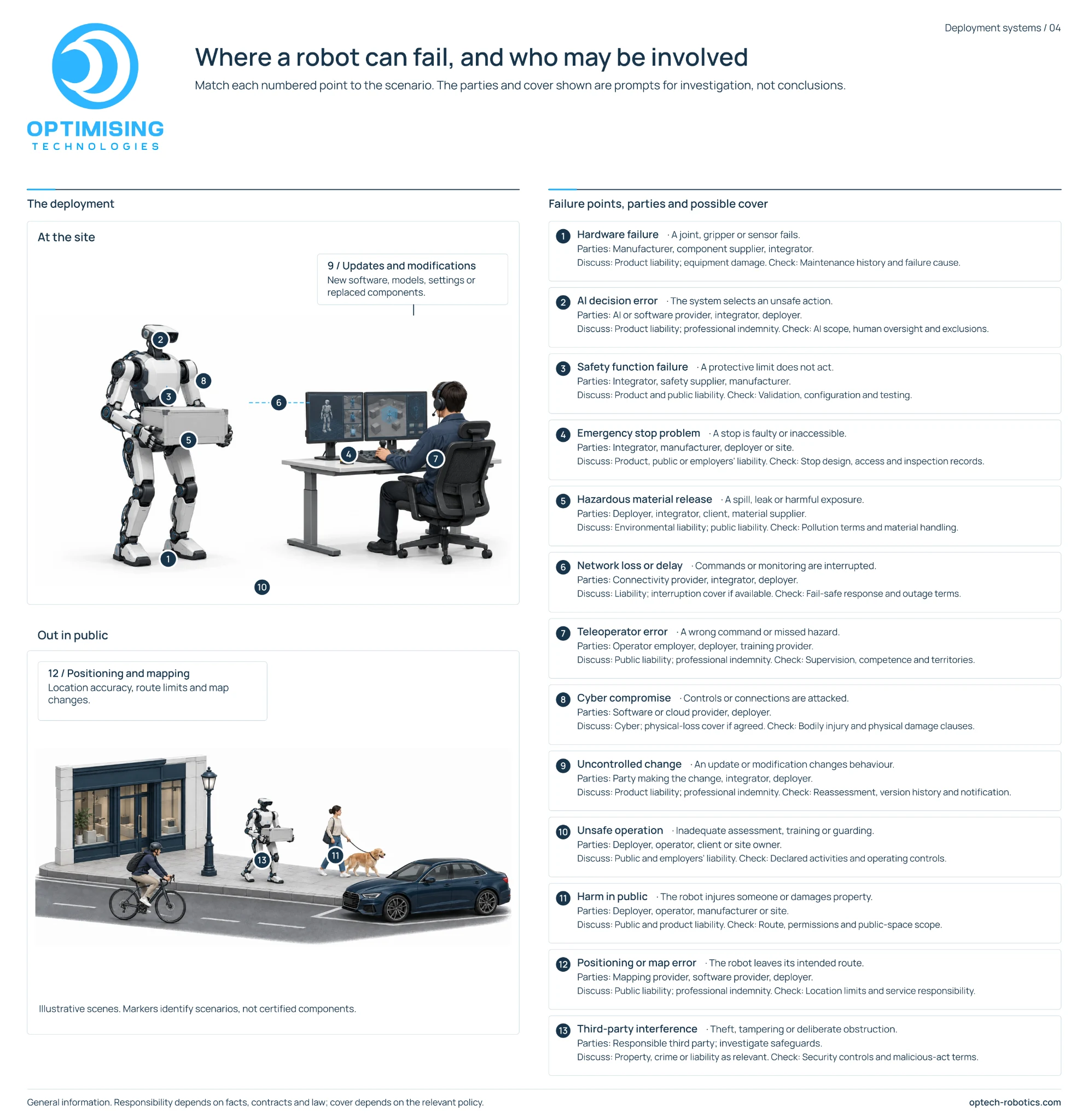
What could go wrong, and what evidence would help?
Start with a failure scenario, then identify who may be involved and what records could explain the event. The policy categories shown are discussion prompts, not confirmation of cover.
 Open full-size diagram (opens in a new tab)
Bring the scenario to your broker or insurer
- Describe the robot, activity and people or property exposed.
- Explain the failure, potential loss and evidence available.
- Ask about insured activities, exclusions, conditions, limits and notification requirements.
Read all 13 failure scenarios in text
Hardware failure
A joint, gripper or sensor fails. Parties may include the manufacturer, component supplier and integrator. Discuss product liability and equipment damage; check maintenance history and the failure cause.
AI decision error
The system selects an unsafe action. Parties may include the AI or software provider, integrator and deployer. Discuss product liability and professional indemnity; check AI scope, human oversight and exclusions.
Safety function failure
A protective limit does not act. Parties may include the integrator, safety supplier and manufacturer. Discuss product and public liability; check validation, configuration and testing.
Emergency stop problem
A stop is faulty or inaccessible. Parties may include the integrator, manufacturer, deployer or site. Discuss product, public or employers’ liability; check stop design, access and inspection records.
Hazardous material release
A spill, leak or harmful exposure occurs. Parties may include the deployer, integrator, client and material supplier. Discuss environmental and public liability; check pollution terms and material handling.
Network loss or delay
Commands or monitoring are interrupted. Parties may include the connectivity provider, integrator and deployer. Discuss liability and interruption cover if available; check the fail-safe response and outage terms.
Teleoperator error
A wrong command or missed hazard. Parties may include the operator employer, deployer and training provider. Discuss public liability and professional indemnity; check supervision, competence and territories.
Cyber compromise
Controls or connections are attacked. Parties may include the software or cloud provider and deployer. Discuss cyber and physical-loss cover if agreed; check bodily injury and physical damage clauses.
Uncontrolled change
An update or modification changes behaviour. Parties may include whoever made the change, the integrator and deployer. Discuss product liability and professional indemnity; check reassessment, version history and notification.
Unsafe operation
Inadequate assessment, training or guarding. Parties may include the deployer, operator, client or site owner. Discuss public and employers’ liability; check declared activities and operating controls.
Harm in public
The robot injures someone or damages property. Parties may include the deployer, operator, manufacturer or site. Discuss public and product liability; check the route, permissions and public-space scope.
Positioning or map error
The robot leaves its intended route. Parties may include the mapping provider, software or robot provider and deployer. Discuss public liability and professional indemnity; check location limits and service responsibility.
Third-party interference
Theft, tampering or deliberate obstruction. Investigate safeguards and the responsible third party. Discuss property, crime or liability as relevant; check security controls and malicious-act terms.
Turn the picture into a practical conversation
Tell us about your robot, task and environment.
Use NOMOS to explore the assessment workflow, or talk to us about the evidence gaps you are trying to close.
NOMOS is a working prototype with illustrative checks. Optimising Technologies does not currently advise on, arrange, sell or provide insurance.
Further reading
Useful starting points for UK deployments. Other locations have their own requirements.
- HSE: introduction to machinery safety (opens in a new tab)
- ABI: business insurance (opens in a new tab)
- ICO: video surveillance guidance (opens in a new tab)
General information, illustrated with hypothetical deployments. Responsibility depends on facts, contracts and applicable law. Insurance cover depends on the relevant policy. Discuss your circumstances with appropriate safety, legal and insurance specialists.